Onboarding
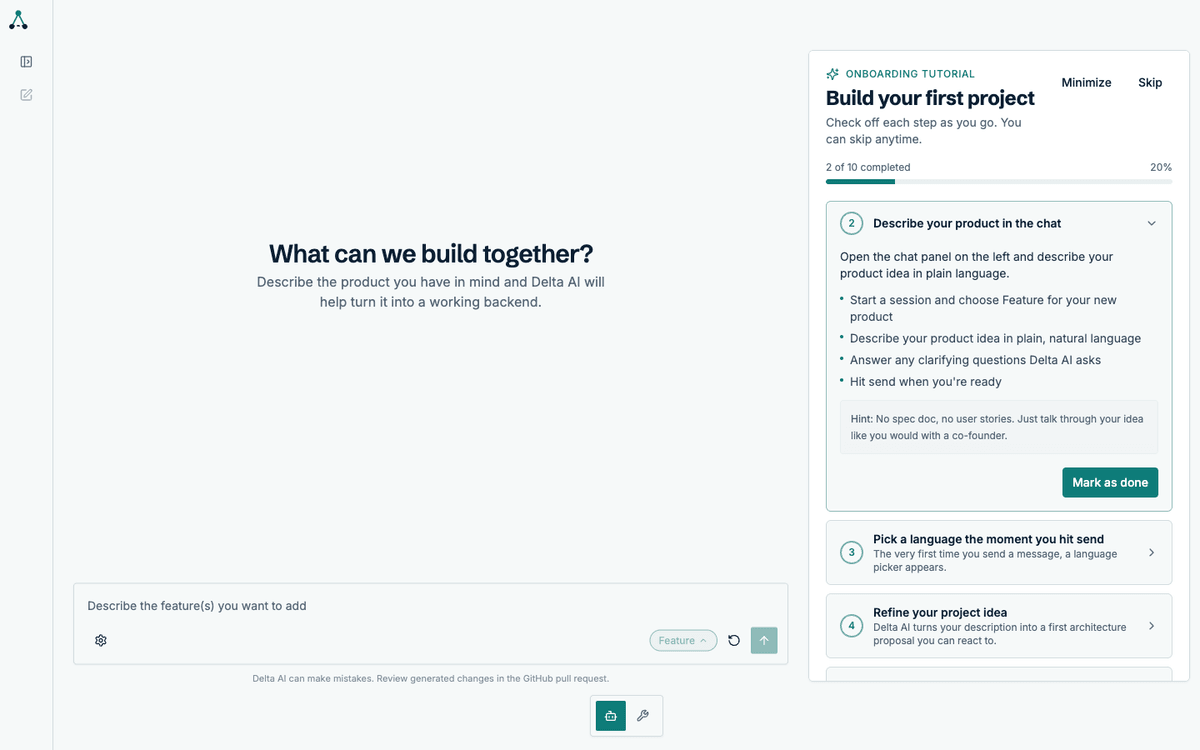
A new workspace shows a ten-step tutorial in the right-hand panel. It is a checklist, not a gate: you can minimise it, skip it, or mark steps done as you go. It exists so a first-time user always knows what to try next.
This page walks through what each step teaches and where to find the feature it points at.
How the tutorial behaves
Section titled “How the tutorial behaves”The panel tracks your progress as a percentage and remembers what you have completed. Steps complete automatically when you perform the action they describe, or you can mark them done yourself.
The ten steps
Section titled “The ten steps”| Step | What it teaches |
|---|---|
| 1 | Describe your product in the composer |
| 2 | Answer the clarifying questions |
| 3 | Choose your programming language |
| 4 | Review the draft before it is locked |
| 5 | Watch the architecture being designed |
| 6 | Review and approve the architecture plan |
| 7 | Follow the specification runs per service |
| 8 | Review the implementation plans |
| 9 | Review diffs and approve pull requests |
| 10 | Continue with sessions and chat modes |
Steps 1–4 happen before any code is generated. Steps 5–8 are the workflow itself. Step 9 is where you review what was produced. Step 10 hands you over to the session model.
Plan mode during onboarding
Section titled “Plan mode during onboarding”If plan mode is enabled for a step, that step pauses and waits for your approval before continuing. The tutorial does not change this — it only points at it. See Plan mode for how approval works.
When to skip it
Section titled “When to skip it”If you already know the product, skip the tutorial. Nothing in the workflow depends on it, and no feature is gated behind a completed step.