Sessions and chat modes
A session is the container for a piece of work on a project. It holds one or more conversations, and it owns the change set those conversations produce. Getting the session/conversation distinction right is what makes the rest of the product predictable.
Session, conversation, change set
Section titled “Session, conversation, change set”The three are nested, and the nesting matters:
| Level | What it is | How many |
|---|---|---|
| Session | A unit of work on a project, seeded from the project’s merged state | One per piece of work |
| Conversation | A single chat thread with its own mode | One or more per session |
| Change set | The pull requests the session’s runs produced | Exactly one per session |
A session is created against the project’s current merged state. Everything the session does is layered on top of that snapshot, and the change set is the diff between the two.
What a session owns
Section titled “What a session owns”A session groups:
- Every conversation held in it
- The change set produced by its runs
- The pull requests in that change set
When you open a session, you see its current conversation and its work. When the change set merges, the session becomes read-only.
The session sidebar
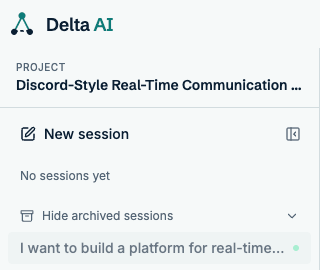
Section titled “The session sidebar”The sidebar lists your sessions for the current project. Expand it from the toggle at the top left.
Conversations
Section titled “Conversations”A session is not a single chat. It is a sequence of conversations, and each one starts fresh while staying anchored in the session’s context.
A new conversation begins when:
- You send the first message in a new session
- You reset the current conversation and send another message
- You send a message after a workflow has completed
Each conversation carries its own mode. Nothing requires every conversation in a session to use the same one — a session can start in Feature mode to add a capability, then switch to Refactor to fix something the first conversation got wrong.
Chat modes
Section titled “Chat modes”The mode is chosen in the composer and applies to the conversation you are starting, not to the session as a whole.
Feature
Section titled “Feature”Feature mode is for changing the system itself: adding a capability, removing one, or reshaping what exists. It is anchored in the design that is actually merged in your design repository, so it works from the real current state rather than from whatever the conversation happens to remember.
Because it can change the system’s shape, Feature mode spans the full workflow — architecture, then specification, then implementation — for whatever it touches.
Use it when you are adding a service, changing a contract, or altering behaviour in a way the architecture needs to know about.
Refactor
Section titled “Refactor”Refactor mode is for targeted edits inside the existing design. The agent does not revisit the architecture or rewrite specifications; it changes code.
Use it when you are fixing a bug, improving an implementation, or changing something that does not alter the system’s shape.
Resetting a conversation
Section titled “Resetting a conversation”Reset discards the current conversation and starts a new one in the same session. It exists for one situation: the conversation has gone somewhere unhelpful and you would rather start over than argue with it.
What reset does:
- Ends the current conversation
- Starts a new one on your next message
- Keeps the session, its change set, and any generated work
What reset does not do:
- It does not revert code, close pull requests, or abandon the change set
- It does not change the session’s seeded state
- It does not undo a workflow that already ran
After a workflow completes
Section titled “After a workflow completes”When a workflow finishes, its conversation is done. Sending another message starts a new conversation in the same session, seeded from the same context: the merged state the session was created against, plus whatever the session’s change set has already produced.
This is how you iterate. A session can hold several conversations — one to build the feature, another to fix what review found, a third to tidy up — all landing in the same change set.
After a merge
Section titled “After a merge”Once the change set merges, the session becomes read-only. The composer is disabled and the conversation cannot be extended.
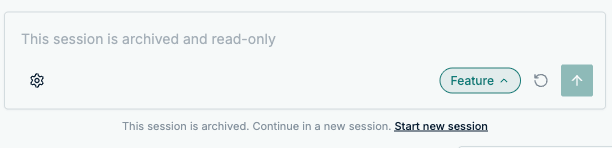
This is deliberate. A merged change set is a finished unit of work, and the session that produced it is a record of how it happened. Continuing the conversation would blur that record.
To keep working, create a new session. It seeds from the project’s current merged state, which now includes everything the previous session landed.
Working in parallel
Section titled “Working in parallel”A project can have several active sessions at once. Each one seeds from the same merged state, so they are independent until one of them lands.
This is useful when you want to work on two things at the same time — the equivalent of git worktrees, without the setup.
Choosing between a new session and a reset
Section titled “Choosing between a new session and a reset”| Situation | Do this |
|---|---|
| Starting unrelated work | New session |
| The conversation went badly, no workflow yet | Reset |
| The conversation went badly, workflow already ran | New conversation (send a message) |
| Previous work merged | New session (the old one is read-only) |
| Want to discard generated work | Abandon the change set |